Qwen-VL
- RK推理模型文件下载链接:https://pan.baidu.com/s/1HFSD9-JyLCB9J4ar0EMOwQ 提取码: root
1.编译可执行程序
1.进入源码目录
cd ~/rknn-llm/examples/Qwen2-VL_Demo/deploy
2.修改交叉编译工具链
vi build-linux.sh
将原本的:
set -e
rm -rf build
mkdir build && cd build

GCC_COMPILER=~/opts/gcc-arm-10.2-2020.11-x86_64-aarch64-none-linux-gnu
cmake .. -DCMAKE_CXX_COMPILER=${GCC_COMPILER}/bin/aarch64-none-linux-gnu-g++  \
        -DCMAKE_C_COMPILER=${GCC_COMPILER}/bin/aarch64-none-linux-gnu-gcc \
        -DCMAKE_BUILD_TYPE=Release \
        -DCMAKE_SYSTEM_NAME=Linux \
        -DCMAKE_SYSTEM_PROCESSOR=aarch64 \

make -j8
make install
修改为:
set -e
rm -rf build
mkdir build && cd build

GCC_COMPILER=aarch64-linux-gnu
cmake .. -DCMAKE_CXX_COMPILER=${GCC_COMPILER}-g++  \
        -DCMAKE_C_COMPILER=${GCC_COMPILER}-gcc \
        -DCMAKE_BUILD_TYPE=Release \
        -DCMAKE_SYSTEM_NAME=Linux \
        -DCMAKE_SYSTEM_PROCESSOR=aarch64 \

make -j8
make install
3.安装cmake
sudo apt install cmake -y
4.增加可执行权限并执行编译
chmod +x build-linux.sh
./build-linux.sh
运行效果:
 baiwen@dshanpi-a1:~/rknn-llm/examples/Qwen2-VL_Demo/deploy$ ./build-linux.sh
-- The C compiler identification is GNU 11.4.0
-- The CXX compiler identification is GNU 11.4.0
-- Detecting C compiler ABI info
-- Detecting C compiler ABI info - done
-- Check for working C compiler: /usr/bin/aarch64-linux-gnu-gcc - skipped
-- Detecting C compile features
-- Detecting C compile features - done
-- Detecting CXX compiler ABI info
-- Detecting CXX compiler ABI info - done
-- Check for working CXX compiler: /usr/bin/aarch64-linux-gnu-g++ - skipped
-- Detecting CXX compile features
-- Detecting CXX compile features - done
-- Found OpenCV: /home/baiwen/rknn-llm/examples/Qwen2-VL_Demo/deploy/3rdparty/opencv-linux-aarch64 (found version "3.4.5")
-- Configuring done
-- Generating done
-- Build files have been written to: /home/baiwen/rknn-llm/examples/Qwen2-VL_Demo/deploy/build
[ 12%] Building CXX object CMakeFiles/llm.dir/src/llm.cpp.o
[ 25%] Building CXX object CMakeFiles/demo.dir/src/image_enc.cc.o
[ 37%] Building CXX object CMakeFiles/demo.dir/src/main.cpp.o
[ 50%] Building CXX object CMakeFiles/imgenc.dir/src/image_enc.cc.o
[ 62%] Building CXX object CMakeFiles/imgenc.dir/src/img_encoder.cpp.o
cc1plus: warning: /home/baiwen/rknn-llm/examples/Qwen2-VL_Demo/deploy/src/image_enc.h: not a directory
cc1plus: warning: /home/baiwen/rknn-llm/examples/Qwen2-VL_Demo/deploy/src/image_enc.h: not a directory
cc1plus: warning: /home/baiwen/rknn-llm/examples/Qwen2-VL_Demo/deploy/src/image_enc.h: not a directory
cc1plus: warning: /home/baiwen/rknn-llm/examples/Qwen2-VL_Demo/deploy/src/image_enc.h: not a directory
cc1plus: warning: /home/baiwen/rknn-llm/examples/Qwen2-VL_Demo/deploy/src/image_enc.h: not a directory
[ 75%] Linking CXX executable llm
[ 75%] Built target llm
[ 87%] Linking CXX executable imgenc
[100%] Linking CXX executable demo
[100%] Built target imgenc
[100%] Built target demo
Consolidate compiler generated dependencies of target imgenc
[ 37%] Built target imgenc
Consolidate compiler generated dependencies of target llm
[ 62%] Built target llm
Consolidate compiler generated dependencies of target demo
[100%] Built target demo
Install the project...
-- Install configuration: "Release"
-- Installing: /home/baiwen/rknn-llm/examples/Qwen2-VL_Demo/deploy/install/demo_Linux_aarch64/./imgenc
-- Set runtime path of "/home/baiwen/rknn-llm/examples/Qwen2-VL_Demo/deploy/install/demo_Linux_aarch64/./imgenc" to ""
-- Installing: /home/baiwen/rknn-llm/examples/Qwen2-VL_Demo/deploy/install/demo_Linux_aarch64/./llm
-- Set runtime path of "/home/baiwen/rknn-llm/examples/Qwen2-VL_Demo/deploy/install/demo_Linux_aarch64/./llm" to ""
-- Installing: /home/baiwen/rknn-llm/examples/Qwen2-VL_Demo/deploy/install/demo_Linux_aarch64/./demo
-- Set runtime path of "/home/baiwen/rknn-llm/examples/Qwen2-VL_Demo/deploy/install/demo_Linux_aarch64/./demo" to ""
-- Installing: /home/baiwen/rknn-llm/examples/Qwen2-VL_Demo/deploy/install/demo_Linux_aarch64/lib/librknnrt.so
-- Installing: /home/baiwen/rknn-llm/examples/Qwen2-VL_Demo/deploy/install/demo_Linux_aarch64/lib/librkllmrt.so
-- Installing: /home/baiwen/rknn-llm/examples/Qwen2-VL_Demo/deploy/install/demo_Linux_aarch64/./demo.jpg
5.进入可执行文件目录
cd install/demo_Linux_aarch64/
6.将预训练和转换完成的模型文件传输至开发板端中
baiwen@dshanpi-a1:~/rknn-llm/examples/Qwen2-VL_Demo/deploy/install/demo_Linux_aarch64$ ls
demo      imgenc  llm                               qwen2.5-vl-3b-w4a16_level1_rk3576.rkllm  Qwen3-1.7B-rk3576-w4a16.rkllm
demo.jpg  lib     qwen2_5_vl_3b_vision_rk3576.rknn  Qwen3-0.6B-rk3576-w4a16.rkllm            Qwen3-4B-rk3576-w4a16.rkllm
2.模型推理
2.1 Qwen2.5-vl-3B
1.导入依赖和环境变量
export LD_LIBRARY_PATH=./lib
export RKLLM_LOG_LEVEL=1
2.执行程序
./llm ./qwen2.5-vl-3b-w4a16_level1_rk3576.rkllm 128 512
argv[1]
model_pathRKLLM 转换后的模型文件路径,例如./qwen2.5-vl-3b-w4a16_level1_rk3576.rkllm。argv[2]
max_new_tokens每次生成回答时最多输出多少个 token(整数)。例如 512。argv[3]
max_context_len模型一次能接受的最大上下文长度(提示 + 已生成的文本)。例如 2048。
运行效果如下:

2.2 Qwen3-0.6B
1.导入依赖和环境变量
export LD_LIBRARY_PATH=./lib
export RKLLM_LOG_LEVEL=1
2.执行程序
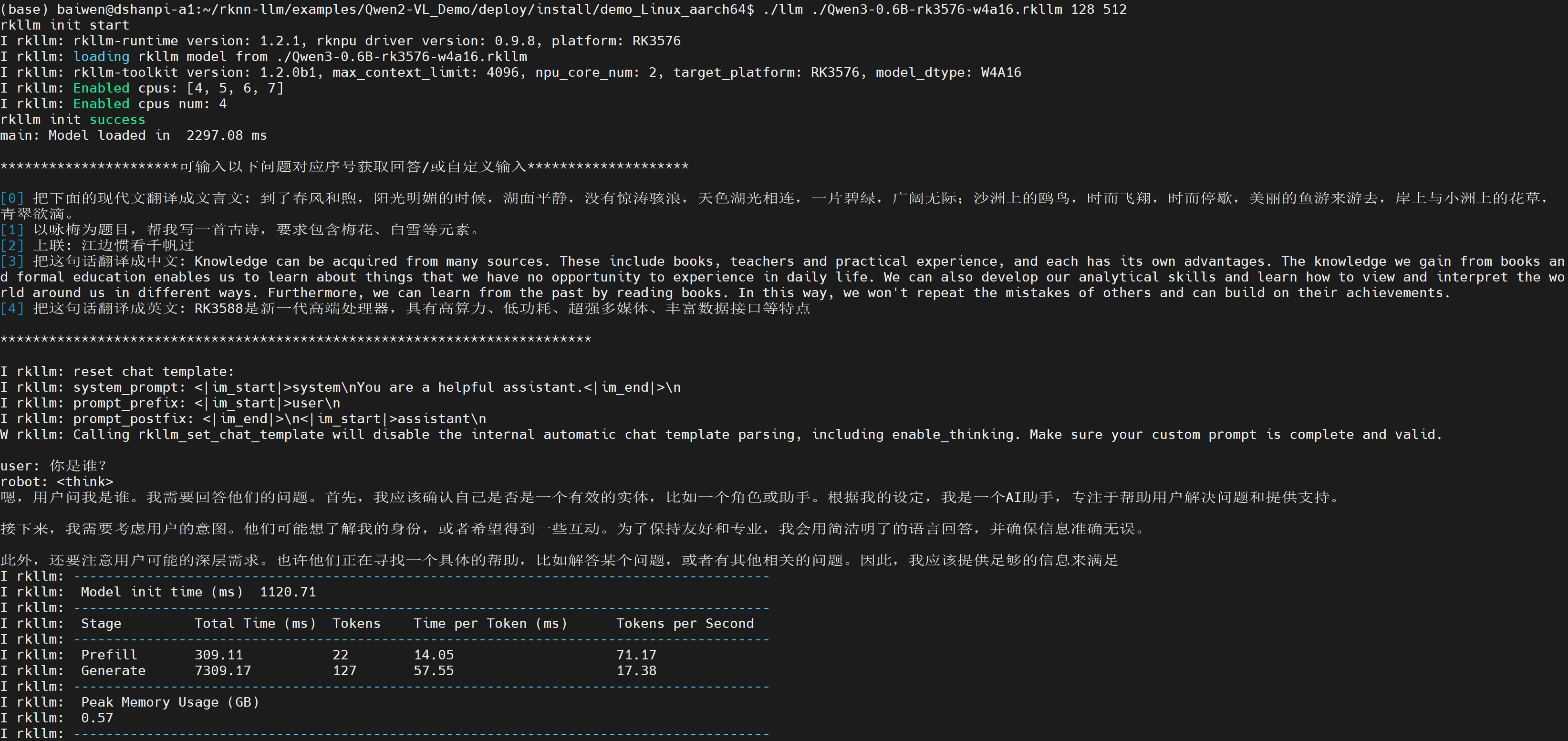
./llm ./Qwen3-0.6B-rk3576-w4a16.rkllm 128 512
运行效果如下:
2.3 Qwen3-1.7B
1.导入依赖和环境变量
export LD_LIBRARY_PATH=./lib
export RKLLM_LOG_LEVEL=1
2.执行程序
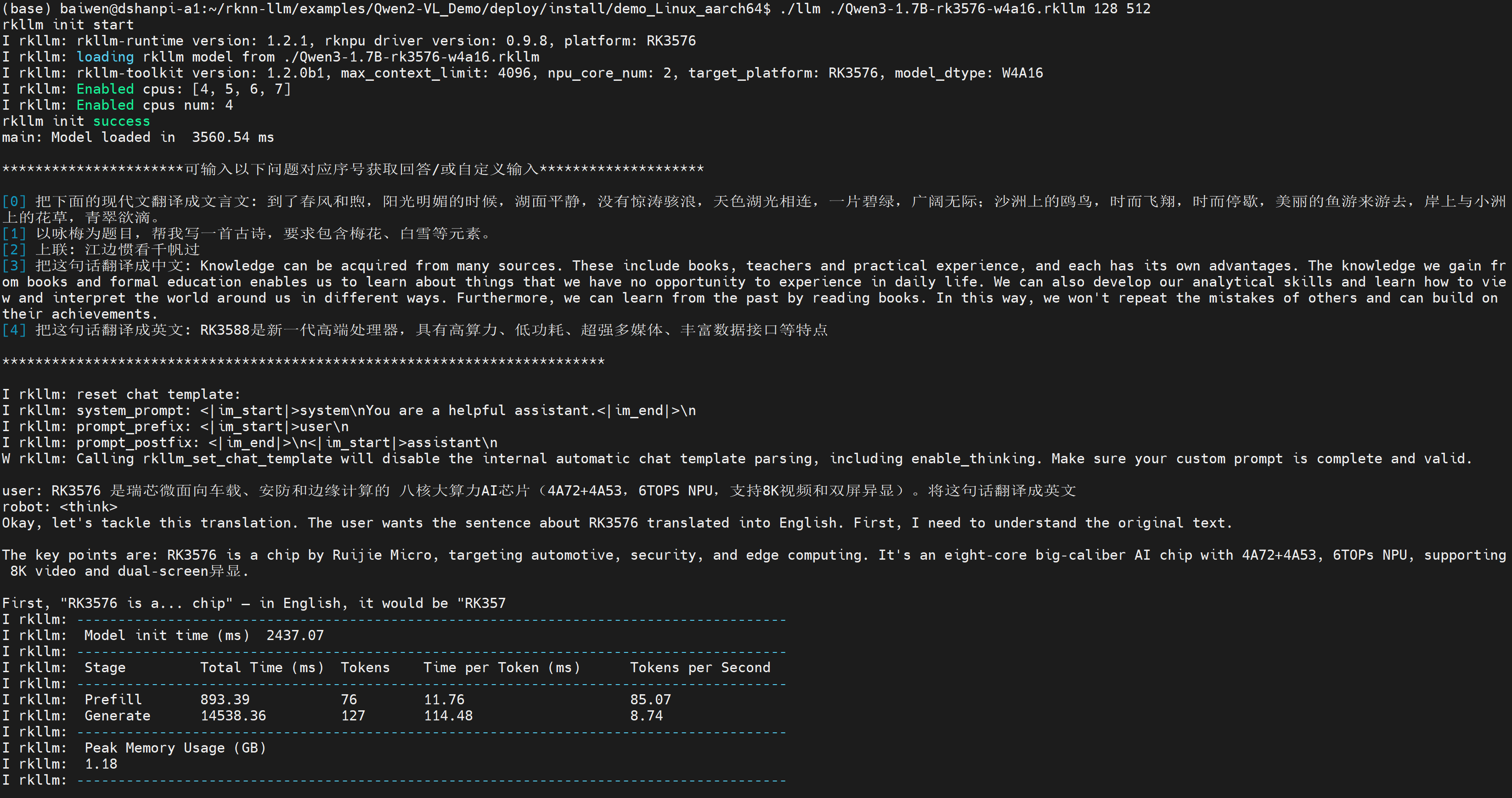
./llm ./Qwen3-1.7B-rk3576-w4a16.rkllm 128 512
运行效果如下:
2.4 Qwen3-4B
1.导入依赖和环境变量
export LD_LIBRARY_PATH=./lib
export RKLLM_LOG_LEVEL=1
2.执行程序
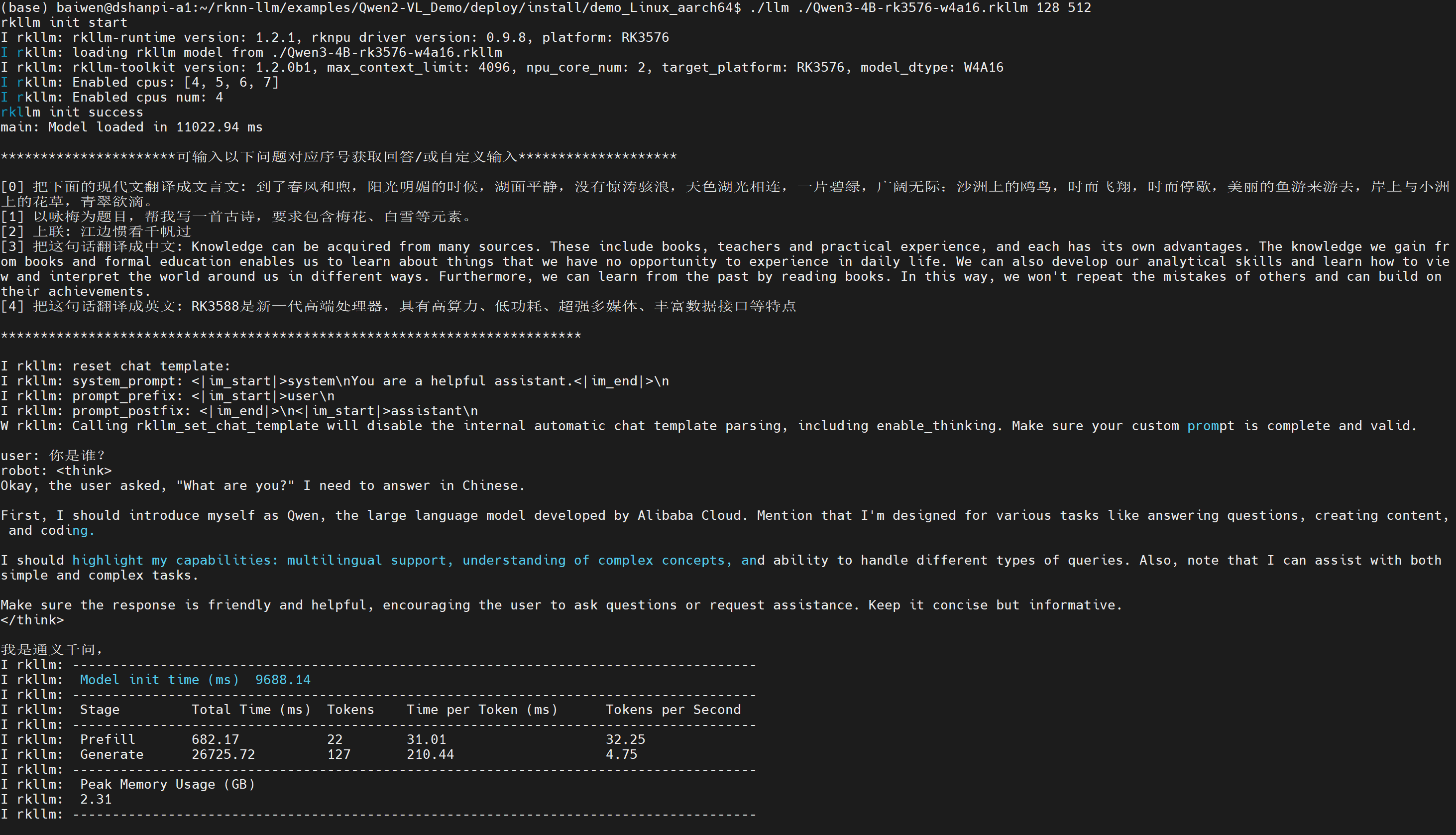
./llm ./Qwen3-4B-rk3576-w4a16.rkllm 128 512
运行效果如下:
3.多模态模型部署
注意:本程序需要在大于6GB内存的硬件上运行,如果内存小于6GB,可能会运行失败!
由于我们使用的是qwen2.5-vl-3b-w4a16_level1_rk3576.rkllm文本处理模型和qwen2_5_vl_3b_vision_rk3576.rknn图像处理模型,共同推理实现识别图像内容回复文本。
2.1 修改源码
进入~/rknn-llm/examples/Qwen2-VL_Demo/deploy/src源码目录,修改main.cpp,将代码中的:
#define EMBED_SIZE 1536
修改为:
#define EMBED_SIZE 2048
原因是:Qwen2-VL 系列模型提供 2B、3B、7B 等多种参数规模。不同规模的模型,其视觉编码器(Vision Encoder + Projector)输出的图像特征向量维度各不相同:2B 模型为 1536 维,3B 模型为 2048 维,7B 模型为 3584 维。我们使用的3B的模型,需填入:2048
修改完成后,需要重新编译源码,回到编译目录下:
cd ~/rknn-llm/examples/Qwen2-VL_Demo/deploy
执行编译命令:
./build-linux.sh
进入可执行文件目录:
cd install/demo_Linux_aarch64/
将预训练和转换完成的模型文件传输至开发板端中:
baiwen@dshanpi-a1:~/rknn-llm/examples/Qwen2-VL_Demo/deploy/install/demo_Linux_aarch64$ ls
demo  demo.jpg  imgenc  lib  llm  qwen2_5_vl_3b_vision_rk3576.rknn  qwen2.5-vl-3b-w4a16_level1_rk3576.rkllm
2.2 运行程序
1.导入依赖和环境变量
export LD_LIBRARY_PATH=./lib
export RKLLM_LOG_LEVEL=1
2.执行程序
./demo ./demo.jpg ./qwen2_5_vl_3b_vision_rk3576.rknn ./qwen2.5-vl-3b-w4a16_level1_rk3576.rkllm 128 512 3
执行后如下所示:
baiwen@dshanpi-a1:~/rknn-llm/examples/Qwen2-VL_Demo/deploy/install/demo_Linux_aarch64$ ./demo ./demo.jpg ./qwen2_5_vl_3b_vision_rk3576.rknn ./qwen2.5-vl-3b-w4a16_level1_rk3576.rkllm 128 512 3
I rkllm: rkllm-runtime version: 1.2.1, rknpu driver version: 0.9.8, platform: RK3576
I rkllm: loading rkllm model from ./qwen2.5-vl-3b-w4a16_level1_rk3576.rkllm
I rkllm: rkllm-toolkit version: 1.2.1, max_context_limit: 4096, npu_core_num: 2, target_platform: RK3576, model_dtype: W4A16
I rkllm: Enabled cpus: [4, 5, 6, 7]
I rkllm: Enabled cpus num: 4
I rkllm: Using mrope
rkllm init success
main: LLM Model loaded in  7346.11 ms
===the core num is 3===
E RKNN: [08:04:38.229] rknn_set_core_mask: unavailable core mask found for current platform! max core mask = 3
model input num: 1, output num: 1
input tensors:
  index=0, name=pixel, n_dims=4, dims=[1, 392, 392, 3], n_elems=460992, size=921984, fmt=NHWC, type=FP16, qnt_type=AFFINE, zp=0, scale=1.000000
output tensors:
  index=0, name=34548, n_dims=2, dims=[196, 2048, 0, 0], n_elems=401408, size=802816, fmt=UNDEFINED, type=FP16, qnt_type=AFFINE, zp=0, scale=1.000000
model input height=392, width=392, channel=3
main: ImgEnc Model loaded in  7752.90 ms
I rkllm: reset chat template:
I rkllm: system_prompt: <|im_start|>system\nYou are a helpful assistant.<|im_end|>\n
I rkllm: prompt_prefix: <|im_start|>user\n
I rkllm: prompt_postfix: <|im_end|>\n<|im_start|>assistant\n
W rkllm: Calling rkllm_set_chat_template will disable the internal automatic chat template parsing, including enable_thinking. Make sure your custom prompt is complete and valid.

**********************可输入以下问题对应序号获取回答/或自定义输入********************

[0] <image>What is in the image?
[1] <image>这张图片中有什么?

*************************************************************************

user:
如果想让大模型分析图片中的内容可输入一下内容:
<image>What is in the image?
运行结果参考如下:
user: <image>What is in the image?
robot: The image appears to be a digitally created or manipulated scene featuring an astronaut on the moon's surface, lying down with their head resting on what seems to be a helmet or spacecraft part. The astronaut is holding a bottle of beer and has another bottle next to them. In the background, there are elements such as Earth visible through a crater in the lunar landscape, and some industrial structures like stairs leading up to an object that resembles a ladder or ramp.

The overall setting suggests a humorous or surreal take on space exploration, blending elements of everyday life with the vastness of outer space.
I rkllm: --------------------------------------------------------------------------------------
I rkllm:  Model init time (ms)  5482.81
I rkllm: --------------------------------------------------------------------------------------
I rkllm:  Stage         Total Time (ms)  Tokens    Time per Token (ms)      Tokens per Second
I rkllm: --------------------------------------------------------------------------------------
I rkllm:  Prefill       4143.53          223       18.58                    53.82
I rkllm:  Generate      20911.60         116       180.27                   5.55
I rkllm: --------------------------------------------------------------------------------------
I rkllm:  Peak Memory Usage (GB)
I rkllm:  4.55
I rkllm: --------------------------------------------------------------------------------------